How I orchestrate twenty Claude Code sessions from my phone
This is a hands on guide to building an agent harness to orchestrate a fleet of Claude Code instances. We start from a single Claude Code session in a tmux pane and build up to a fleet of long-running sessions, one per project, reachable from a chat app through a routing gateway, with an MCP reply tool, long-term memory, reminders, and background workers. The channel layer is just an adapter; I wire it to Telegram because that's how I often run mine. Real code, real file paths, the actual architecture I run every day
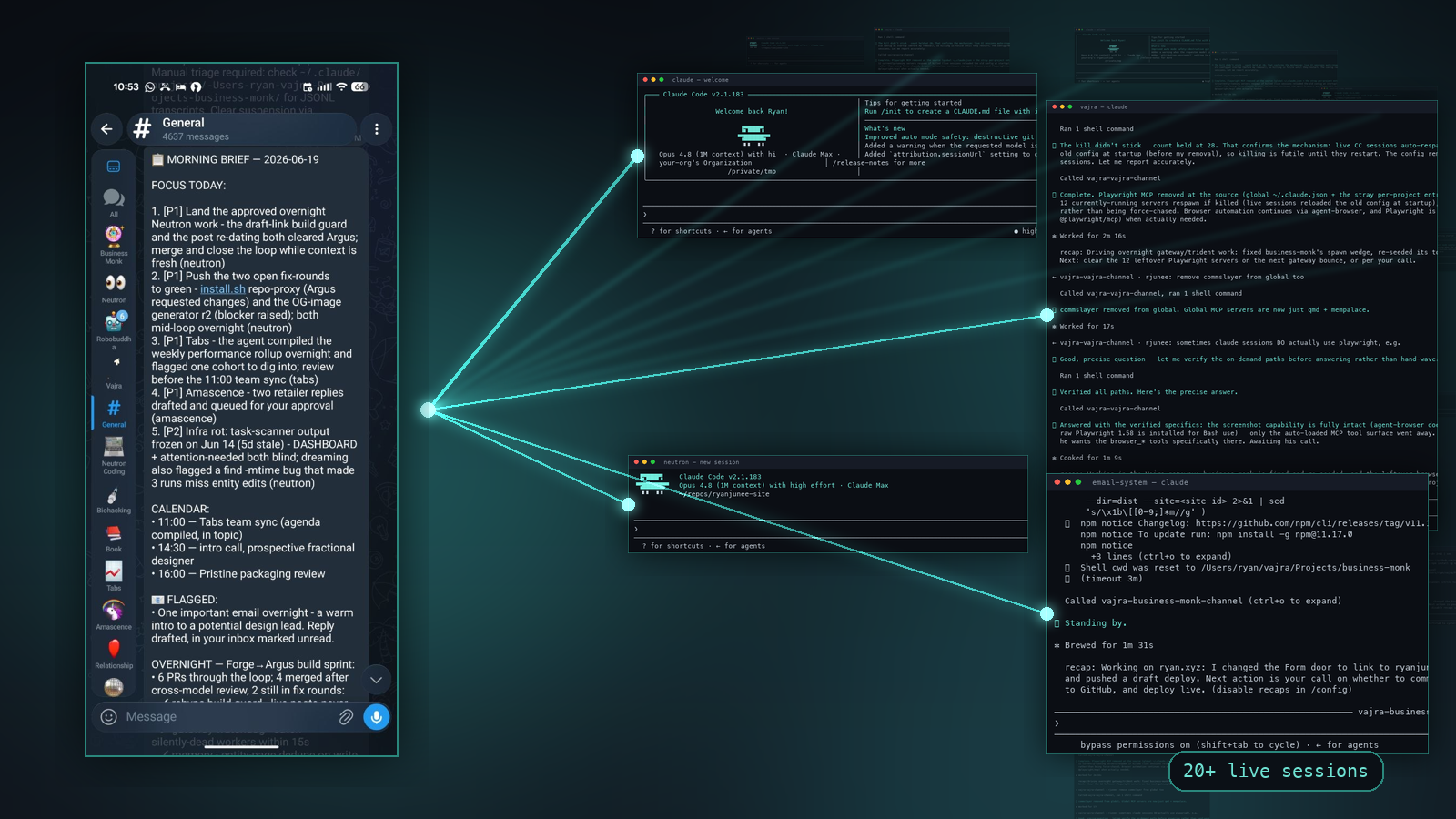
I run 20+ long-running Claude Code sessions at once. One per business area, one per side project, several for my personal life. Each one is a long-lived process that has been alive for days or weeks, holding the full history of its project. I talk to all of them from Telegram on my phone, by voice, while I’m walking the dogs. When I ask one of them to ship code or run a research job, it hands the work to a background worker that posts the result back when it’s done.
Some of my other posts explain why I built this and what it feels like to live in it. This post is the build guide. If you can install Bun, drive tmux at a basic level, and read TypeScript and bash, you can build the spine of this yourself in a weekend. Although to be fair, working out all the edge cases in production can take months, which is why I released what I’ve built open source as Neutron.
My private installation I run is called Vajra, which I re-wrote as the public open source version called Neutron. Everything below is lifted from the actual Vajra source code.
What we’re building
The end state is a fleet of long-running Claude Code sessions, one per project, that you address from a chat app. Here is the whole shape on one screen.
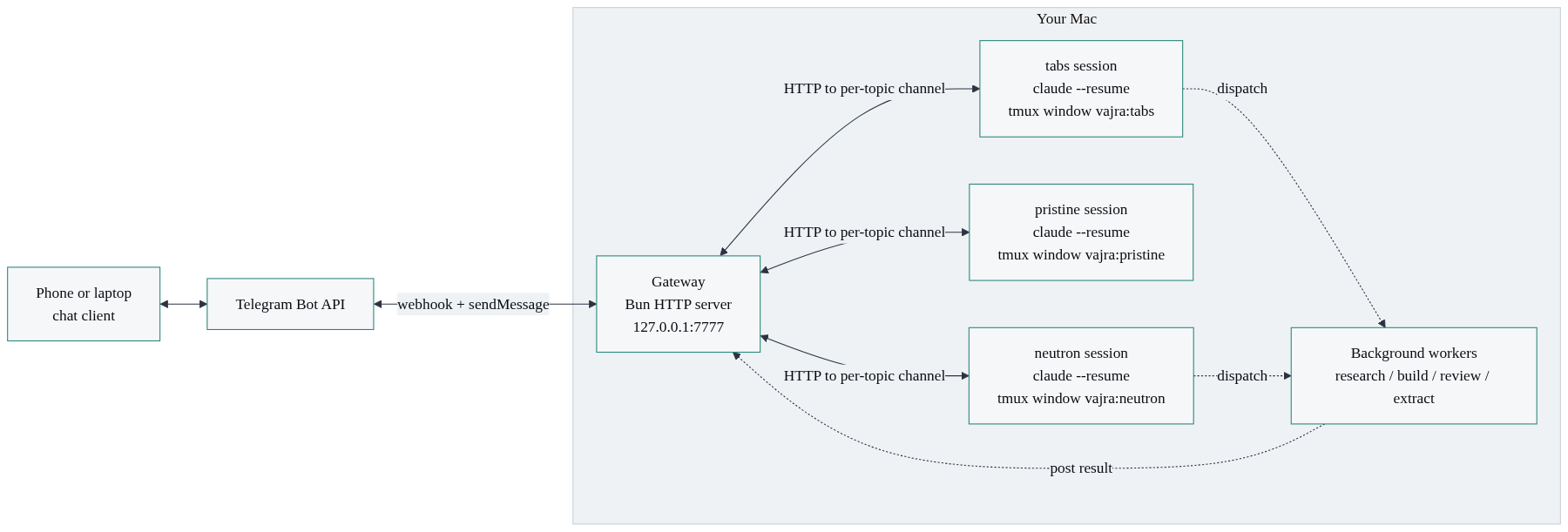
Five moving parts:
- Long-running Claude Code sessions, one per project, each in its own tmux window, each resumable across days.
- Channels, a routing concept that ties one Telegram topic to one session.
- A gateway, a small Bun HTTP server that routes messages in and out and supervises everything.
- A Telegram bot with forum topics, so each project gets its own thread, plus an MCP reply tool so a session can talk back.
- Memory, reminders, and background workers layered on top.
The phone never runs any of this. The phone runs a chat client. Your Mac runs the substrate. The chat client is the window; the Mac is the brain. Neutron ships that window as a web app and a mobile app by default. In this teardown I wire it to Telegram, because Telegram is what I run every day and it hands you forum topics, voice notes, and inline buttons for free. Read the channel layer as an adapter: swap Telegram for the web app, or anything else that can carry a message in and a reply out, and nothing else in the architecture changes.
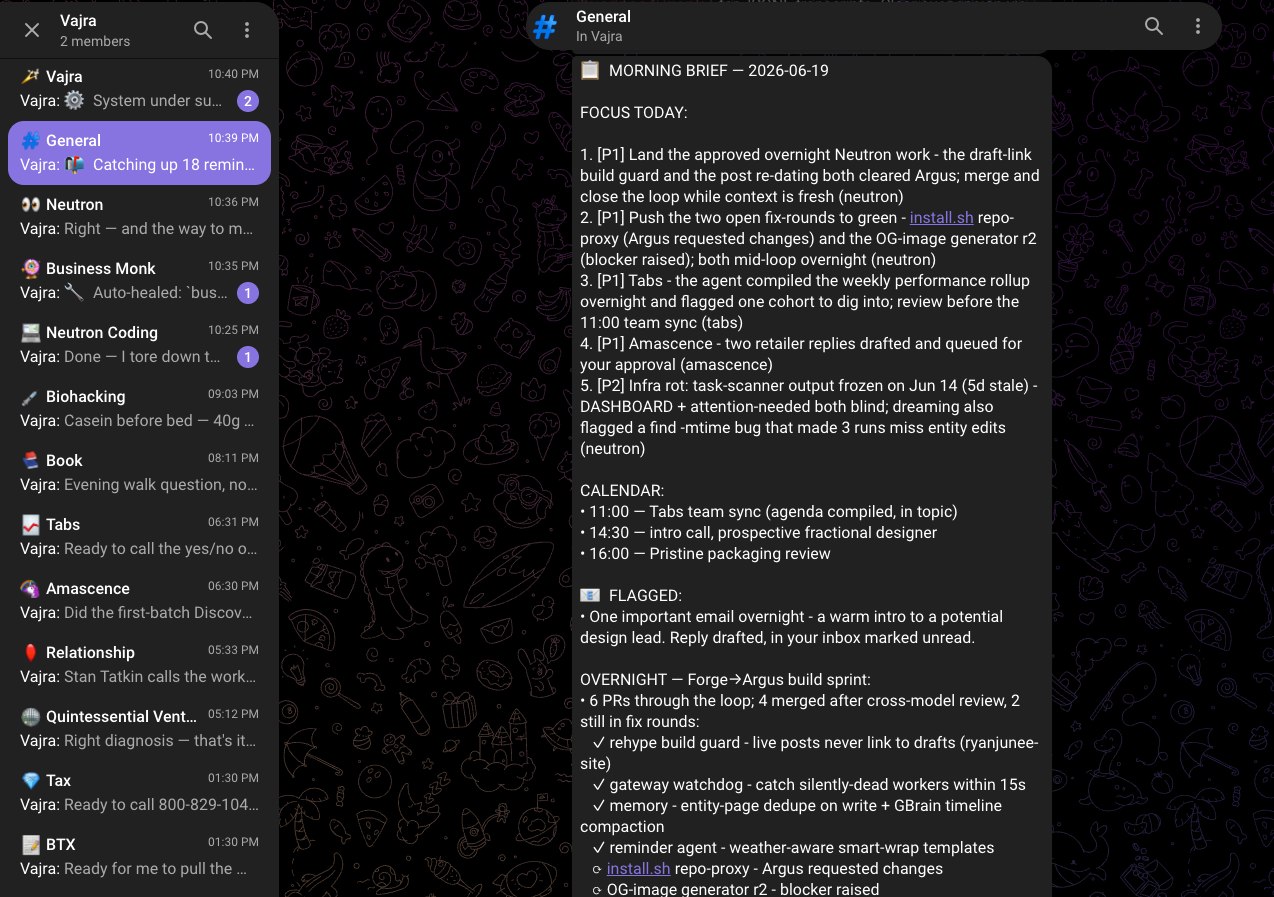
That screenshot is the whole interface: a list of forum topics, one per project, each one a live Claude Code session waiting for you. Let’s build it piece by piece.
Piece 1: long-running Claude Code sessions in tmux
Everything starts here, and this piece alone is useful even if you build nothing else.
Most people use Claude Code one session at a time, in a terminal they’re looking at. You open it, you work, you close it, the context is gone. The next session starts cold. If you run a business through an agent, starting cold every time is the whole problem: you re-explain who your COO is, how you like emails written, what you decided last week, every single time.
The fix is a session that never ends. Claude Code persists every session to disk as a JSONL transcript and can resume any of them by ID with --resume. So the move is: start one session per project, keep it alive, and when you do have to restart it (a crash, a machine reboot, a CLI upgrade), resume the exact same session so the context comes back.
tmux is what keeps the session alive when you’re not looking at it. A tmux window holds a running process whether or not any terminal is attached. Start a session inside one, detach, and it keeps running.
Here is the minimum viable version. Start a session for a project called tabs:
# Create a detached tmux session named "vajra" if it doesn't exist,
# with one window per project.
tmux new-session -d -s vajra -n tabs -c ~/projects/tabs

# Launch Claude Code inside that window.
tmux send-keys -t vajra:tabs 'claude' Enter
That’s a live Claude Code session running headless in a tmux window. You can attach to watch it (tmux attach -t vajra), detach again (Ctrl-b d), and it keeps its full conversation history the entire time.
The session ID is the unit of project state. Claude Code writes each session to ~/.claude/projects/<escaped-cwd>/<session-id>.jsonl. That file is the conversation. When you need to bring a session back after a restart, you resume that ID:
tmux send-keys -t vajra:tabs "claude --resume 'a51a6e46-1326-4684-9ad7-350cd6d2e022'" EnterOne window per project. Each window is a different working directory, a different conversation, a different slice of context. The tabs session has never seen the pristine files and never will. Project boundaries stop being a convention you hope the agent respects and become a property of the operating system: they’re different processes with different working directories.
In my setup the real spawn command is richer (it wires in the reply tool, a settings file, a system prompt, and a model), but the bones are exactly this. Here is the actual command the gateway builds for a topic session, from gateway/gateway-core.ts:
// buildSpawnCommand() in gateway/gateway-core.ts
let cmd = `cd '${cwdSafe}' && claude`
if (resume && entry.has_session) {
  // Prefer the captured UUID over the display name: the UUID is globally
  // unique, the title is not.
  const target = entry.session_id ?? entry.session_name
  cmd += ` --resume '${target}'`
} else {
  cmd += ` -n 'vajra-${entry.name}'`
}
cmd += ` --dangerously-load-development-channels 'server:${channelName}'`
cmd += ` --mcp-config '${mcpConfigPath}'`
cmd += ` --settings '${settingsPath}'`
cmd += ` --dangerously-skip-permissions`
cmd += ` --append-system-prompt-file '${promptFileSafe}'`
cmd += ` --add-dir '${vajraDir}'`
cmd += ` --model '${getSmartModel()}'`
Note what it is not: there is no --print, no one-shot flag. This is a plain interactive claude process that stays alive and holds its context. The --resume is how it survives restarts. Everything else on that command (--mcp-config, --dangerously-load-development-channels, --settings, --append-system-prompt-file) is plumbing we’ll build up over the next few sections.
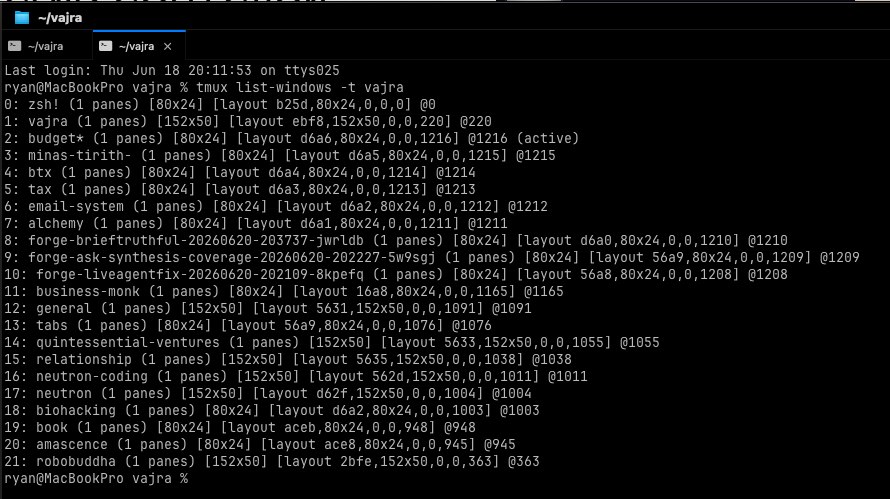
Run tmux list-windows -t vajra and you see the whole fleet: twenty windows, twenty live Claude Code processes, each one holding a project. That list is the substrate. Everything else in this post exists to make that list reachable from your phone.
Piece 2: channels, a routing layer
You now have twenty live sessions. The next problem is obvious: when a message comes in, which session does it belong to?
That’s what a channel is. A channel is a named conduit, one per project, that the gateway uses to deliver a message into one specific session and receive replies back from it. In my setup the mapping is one-to-one all the way down:
one project = one Telegram topic = one channel = one tmux window = one Claude Code sessionThe routing table that holds this together is a single JSON file, gateway/topic-map.json. The key is the Telegram topic’s thread ID. The value carries everything needed to find and talk to the right session. Here is a real entry, lightly trimmed:
{
  "2828": {
    "thread_id": "2828",
    "name": "tabs",
    "session_name": "vajra-tabs",
    "port": 18805,
    "cwd": "/Users/ryan/repos/tabs",
    "prompt_file": "/Users/ryan/vajra/Projects/tabs/PROMPT.md",
    "has_session": true,
    "session_id": "54a5d81f-3681-403f-8241-bfe8ca4717ca",
    "cc_starttime": "Fri Jun  5 15:58:47 2026",
    "pid": 88157
  }
}
Every field earns its place. cwd is the working directory the session runs in. prompt_file is the topic’s personality layer. session_id is what --resume needs. port is a loopback port we’ll use in a moment for the reply path. pid and cc_starttime are for the watchdog to check liveness.
The simplest possible delivery is the one we already used to start the session: type into its pane. If a Claude Code session is running interactively in vajra:tabs, you can hand it a prompt by sending keystrokes to that window, exactly as if you’d typed them:
import { spawnSync } from 'node:child_process'
import topicMap from './topic-map.json'

// Minimum viable inbound: type the message into the session's tmux window.
function deliverToSession(threadId: string, body: string) {
  const entry = topicMap[threadId]
  if (!entry) throw new Error(`no channel for thread ${threadId}`)
  const target = `vajra:${entry.name}`
  spawnSync('tmux', ['send-keys', '-t', target, body, 'Enter'])
}
This works. It is genuinely how you’d hand-drive a fleet on day one, and it’s worth building first because it makes the routing concrete: a message for thread 2828 becomes keystrokes in window vajra:tabs, and the session reads them as a prompt.
It also has two problems that show up the moment you get serious. First, you can only pass a flat string; there’s no structured payload (who sent it, in which chat, with what metadata). Second, keystrokes race the terminal UI. If the session happens to be showing a tool-approval prompt when your keystrokes land, you can answer the wrong question. We solve both in Piece 4 by upgrading the inbound path from keystrokes to a proper channel. For now, hold the mental model: the gateway looks up the thread, finds the session, and delivers. The reply path back is the more interesting half, and it needs the gateway first.
Piece 3: the gateway
The gateway is the only always-on server in the system. Everything else is either a Claude Code process or a JSON file. It’s a single Bun HTTP server bound to loopback. In production mine is one big file, gateway/index.ts, currently 10,847 lines, listening on 127.0.0.1:7777. Most of those lines are watchdogs and edge cases accumulated over months. The core is small.
Here is a minimal gateway in about 90 lines. It does the two things that matter: take inbound messages from Telegram and route them to a session, and take replies from a session and send them to Telegram.
// gateway.ts - run with: bun gateway.ts
import { readFileSync } from 'node:fs'
import { spawnSync } from 'node:child_process'

const BOT_TOKEN = process.env.BOT_TOKEN!
const PORT = 7777
const topicMap = JSON.parse(readFileSync('./topic-map.json', 'utf8'))

// Index topic-map by thread_id for inbound lookups.
const byThread: Record<string, any> = {}
for (const entry of Object.values(topicMap) as any[]) {
  byThread[entry.thread_id] = entry
}

async function sendToTelegram(chatId: string, threadId: string, text: string) {
  await fetch(`https://api.telegram.org/bot${BOT_TOKEN}/sendMessage`, {
    method: 'POST',
    headers: { 'Content-Type': 'application/json' },
    body: JSON.stringify({
      chat_id: chatId,
      message_thread_id: threadId === 'general' ? undefined : Number(threadId),
      text,
    }),
  })
}

function deliverToSession(entry: any, text: string, meta: Record<string, string>) {
  // v1: keystrokes. v2 (Piece 4) posts to the session's channel HTTP port.
  spawnSync('tmux', ['send-keys', '-t', `vajra:${entry.name}`, text, 'Enter'])
}

Bun.serve({
  port: PORT,
  hostname: '127.0.0.1',
  async fetch(req) {
    const url = new URL(req.url)

    // Telegram delivers inbound updates here.
    if (req.method === 'POST' && url.pathname === '/telegram-webhook') {
      const update = await req.json() as any
      const msg = update.message
      if (msg?.text) {
        const threadId = String(msg.message_thread_id ?? 'general')
        const entry = byThread[threadId]
        if (entry) {
          deliverToSession(entry, msg.text, {
            chat_id: String(msg.chat.id),
            message_thread_id: threadId,
          })
        }
      }
      return Response.json({ ok: true })
    }

    // A session calls this (via its MCP reply tool) to talk back.
    if (req.method === 'POST' && url.pathname === '/reply') {
      const { chat_id, message_thread_id, text } = await req.json() as any
      await sendToTelegram(chat_id, message_thread_id ?? 'general', text)
      return Response.json({ ok: true })
    }

    if (url.pathname === '/health') return Response.json({ ok: true })
    return new Response('not found', { status: 404 })
  },
})

console.log(`gateway on http://127.0.0.1:${PORT}`)
That is a working two-way router. Inbound messages land on /telegram-webhook, get matched to a channel, and get delivered. Replies land on /reply and go out to Telegram. Everything else my production gateway does is built around this spine.
The real route table is wider. The ones that carry weight:
POST /telegram-webhook: inbound from the Bot API.POST /reply: outbound from a session’s reply tool.POST /post: ad-hoc post into any topic, used by background workers to report results.POST /remindersand friends: CRUD over the reminder store.POST /dispatch: cross-topic posting (one session asking another to do something).GET /health: per-topic liveness, scraped by an external watchdog.
The supervision loops
Long-running processes drift. Sessions crash, wedge mid-turn, resume into the wrong directory, or quietly stop binding their port. So underneath the HTTP routes the gateway runs a stack of setInterval loops, each one a small watchdog. The pattern is always the same: tick on a timer, read some on-disk state, detect a bad shape, alert or self-heal.
// The shape every watchdog follows.
setInterval(() => {
  for (const entry of Object.values(topicMap) as any[]) {
    if (!entry.pid) continue
    const alive = isProcessAlive(entry.pid)        // kill -0 under the hood
    const stale = Date.now() - lastTurnAt(entry) > WEDGE_MS
    if (!alive) respawnSession(entry)              // crash recovery
    else if (stale) alert(entry, 'turn wedged')    // surface, don't hide
  }
}, 15_000)
In production this is a dozen separate watchdogs (crash detection, stuck-turn detection, working-directory drift, gateway self-heartbeat, subscription auth lapses, session-size monitoring for auto-compaction, and more). Each exists because of a specific failure I hit in production. I wrote up eleven of those failure modes in detail; the short version is that every cleanup loop is a control problem, and the gateway is mostly cleanup loops.
There’s also an append-only agent registry, a file called running-agents.jsonl, where every background worker writes a spawn row when it starts and a completed row when it exits. The watchdog reads that file every 15 seconds to find workers that spawned but never finished. We’ll get to workers in Piece 7; the registry is how the gateway knows they’re alive.
Piece 4: the channel adapter (I use Telegram)
Now we wire the front door and, critically, the path back out. Everything in this piece is one concrete channel adapter. I’m building the Telegram one because it’s what I run, but the gateway only ever sees “a message came in for thread X” and “send this text back out”; the web app Neutron ships by default plugs into the exact same two routes. Build whichever front door you want behind this interface.
The bot and the webhook
Create a bot by messaging @BotFather on Telegram, run /newbot, and save the token it gives you. Then point Telegram at your gateway. Telegram needs a public HTTPS URL for the webhook, so in development you tunnel to your loopback gateway (ngrok, Cloudflare Tunnel, whatever you like) and register that URL once:
curl -sS "https://api.telegram.org/bot${BOT_TOKEN}/setWebhook" \
  -d "url=https://<your-tunnel>.example.com/telegram-webhook"
From then on, every message anyone sends the bot arrives as a POST to /telegram-webhook, which is exactly the route the minimal gateway already handles.
Forum topics are the killer feature
Turn on Topics in your Telegram group’s settings and the group splits into named threads, like channels in Slack. This is the feature that makes the whole thing usable, because it gives you a clean one-to-one surface: one topic per project, and each topic carries a message_thread_id on every message. That ID is the key into topic-map.json. Open the Tabs topic and every message you send is tagged with the Tabs thread ID, the gateway routes it to the Tabs session, and you’re talking to the agent that knows that business and nothing else.
Creating a project becomes: make a forum topic, grab its thread ID, add a row to topic-map.json, spawn a session. No registration step beyond the file. Convention is the configuration.
The reply tool: how a headless session talks back
Here’s the problem that the whole MCP layer exists to solve. A Claude Code session running in a detached tmux window has no human looking at it. Anything it prints to its terminal is invisible. If the session “answers” by writing text to stdout, nobody ever sees it. The typing indicator on your phone spins forever.
So the session needs a tool that sends a message to Telegram. That tool is an MCP server I attach to every session, and it exposes exactly one verb that matters: reply. When the session wants to respond, it calls reply(chat_id, message_thread_id, text), the MCP server forwards that to the gateway’s /reply route, and the gateway sends it to Telegram. That is the entire round trip.
Here is a minimal version of that MCP server. It’s a stdio MCP server (Claude Code launches it as a subprocess and talks to it over stdin/stdout) that just forwards tool calls to the gateway:
// channel.ts - a minimal MCP server exposing one tool: reply.
// Launched by Claude Code via --mcp-config.
import { Server } from '@modelcontextprotocol/sdk/server/index.js'
import { StdioServerTransport } from '@modelcontextprotocol/sdk/server/stdio.js'
import {
  ListToolsRequestSchema,
  CallToolRequestSchema,
} from '@modelcontextprotocol/sdk/types.js'

const GATEWAY_PORT = process.env.GATEWAY_PORT || '7777'

const mcp = new Server(
  { name: 'vajra-channel', version: '1.0.0' },
  { capabilities: { tools: {} } },
)

mcp.setRequestHandler(ListToolsRequestSchema, async () => ({
  tools: [{
    name: 'reply',
    description: 'Send a message to the Telegram topic. Pass chat_id and ' +
      'message_thread_id from the inbound message meta.',
    inputSchema: {
      type: 'object',
      properties: {
        chat_id: { type: 'string' },
        text: { type: 'string' },
        message_thread_id: { type: 'string' },
      },
      required: ['chat_id', 'text'],
    },
  }],
}))

mcp.setRequestHandler(CallToolRequestSchema, async (req) => {
  if (req.params.name === 'reply') {
    const a = req.params.arguments as any
    await fetch(`http://localhost:${GATEWAY_PORT}/reply`, {
      method: 'POST',
      headers: { 'Content-Type': 'application/json' },
      body: JSON.stringify({
        chat_id: a.chat_id,
        text: a.text,
        message_thread_id: a.message_thread_id,
      }),
    })
    return { content: [{ type: 'text', text: 'sent' }] }
  }
  return { content: [{ type: 'text', text: `unknown tool: ${req.params.name}` }] }
})

await mcp.connect(new StdioServerTransport())
You attach this to a session with --mcp-config, pointing at a tiny JSON file that tells Claude Code how to launch it:
{
  "mcpServers": {
    "vajra-tabs-channel": {
      "command": "bun",
      "args": ["channel.ts"],
      "env": { "GATEWAY_PORT": "7777" }
    }
  }
}
Now the session has a tool called mcp__vajra-tabs-channel__reply. That’s the path back out. Without it, the session can think all it wants and the human sees nothing.
Making the rule stick
A tool existing doesn’t mean the model uses it. The model will sometimes “answer” by printing to the terminal out of habit, and the user gets silence. I tell every session, in its system prompt, that the reply tool is the only way to talk to the user. From prompts/topic-agent-base.md:
CRITICAL: You MUST use the `reply` tool for ALL responses to channel
messages. Text you output to the terminal is NOT visible to the user.
You are running in a headless tmux pane. Only the `reply` tool sends
messages to Telegram.
Written rules erode. So I also enforce it mechanically with a Claude Code Stop hook. The hook runs every time the session tries to end a turn, walks the transcript back to the last user message, checks whether it came from a channel, and if it did, checks whether the session called reply during the turn. If not, the hook blocks the turn from ending:
// gateway/hooks/enforce-reply.ts (the load-bearing 20 lines of 200)
const lastUserTurn = findLastUserTurn(transcript)
if (isChannelMessage(lastUserTurn) && !calledReplyThisTurn(transcript)) {
  console.log(JSON.stringify({
    decision: 'block',
    reason: 'You must call the reply tool before ending this turn. ' +
      'Terminal output is not visible to the user.',
  }))
  process.exit(0)
}
That hook is the difference between “usually replies” and “always replies.” It’s wired in via the --settings file the spawn command passes. The full version is 200 lines and handles exemptions (informational posts from other agents don’t require a reply) and the exact MCP tool-name matching, but the core is those few lines.
Upgrading the inbound path
Remember the two problems with tmux send-keys for inbound: no structured payload, and keystrokes racing the UI. The MCP layer we just built for outbound also gives us a clean inbound path, so in production I deliver messages into the session the same way.
The channel MCP server I attach to each session does double duty. It’s an MCP server talking to Claude Code over stdio, and it’s also a tiny HTTP server listening on that session’s loopback port from the topic map. The gateway delivers an inbound message by POSTing it to that port, and the channel turns it into an MCP notification that Claude Code injects into the running session as a <channel> turn, with full structured metadata:
// Inside the channel server: receive from gateway, inject into the session.
if (req.method === 'POST' && url.pathname === '/message') {
  const body = await req.json() as { text: string; meta?: Record<string, string> }
  await mcp.notification({
    method: 'notifications/claude/channel',
    params: {
      content: body.text,
      meta: body.meta || { chat_id: 'unknown', user: 'gateway' },
    },
  })
  return Response.json({ status: 'delivered' })
}
And the gateway’s deliverToSession, in its grown-up form, becomes an HTTP call instead of keystrokes:
async function deliverToSession(entry: any, text: string, meta: Record<string, string>) {
  await fetch(`http://localhost:${entry.port}/message`, {
    method: 'POST',
    headers: { 'Content-Type': 'application/json' },
    body: JSON.stringify({ text, meta }),
  })
}
Now inbound and outbound both run over loopback HTTP through the channel: structured payloads in both directions, no keystrokes, no UI races. This is the --dangerously-load-development-channels flag on the spawn command earning its keep. The full inbound flow, end to end:
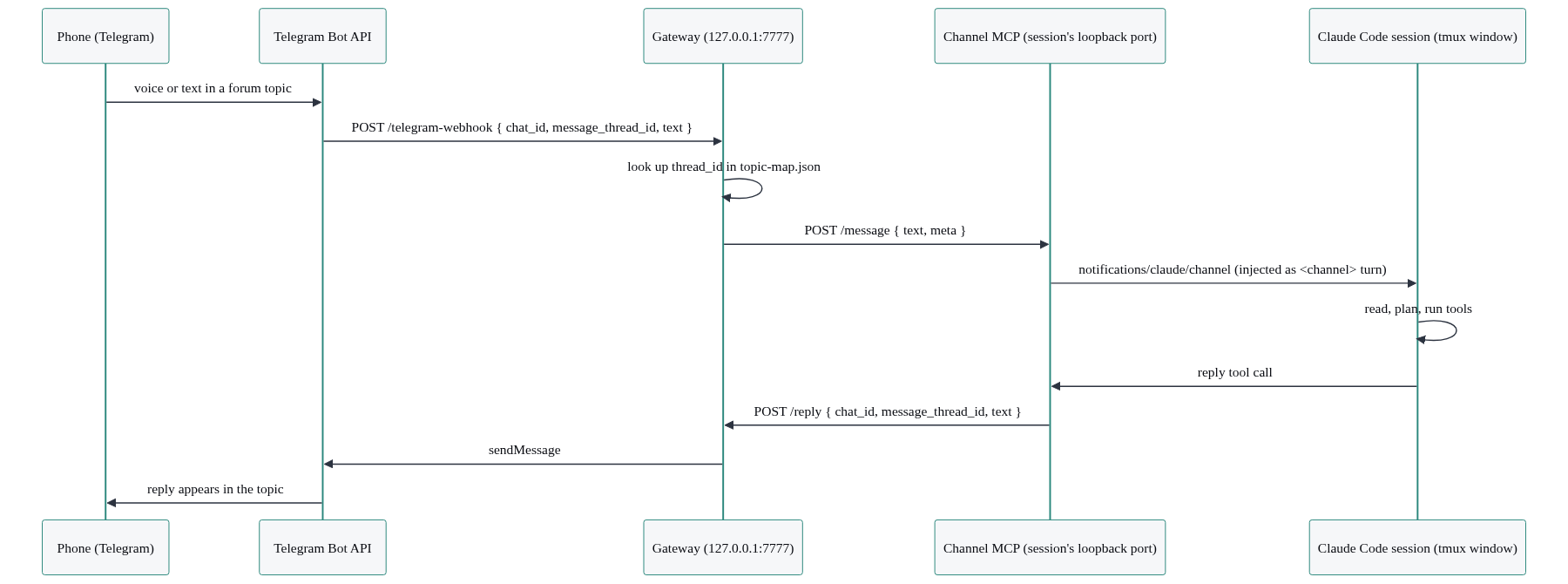
If you only build the keystroke version, it works and you’ll learn a lot. When you’re ready for production, this is the upgrade.
Piece 5: long-term memory
A long-running session has memory of its own conversation. That covers a lot. But cross-session knowledge (who a person is, what a company does, a decision made in a different topic three weeks ago) needs somewhere durable to live, because the Tabs session genuinely cannot see the Pristine conversation, by design.
The minimum viable memory layer is a directory of markdown files the agent reads on demand:
memory/
  people/
    alice.md
    bob.md
  companies/
    pristine.md
  preferences.md
Each file is one entity. The agent greps this directory before a conversation about someone (“who am I about to meet?”) and reads the relevant file into context. That’s it. The whole abstraction is “files the agent reads before it needs them.”
The pattern worth copying for the file format is Garry Tan’s GBrain: one file per entity, a rewritable compiled summary above a horizontal rule, an append-only timeline below it. The summary is the current state of play; the timeline is the audit trail of how you got there.
---
slug: alice-adams
type: person
tier: 1
last_verified: 2026-05-01
---

# Alice Adams

> COO and operating partner across the portfolio. Default owner for
> ops execution. Prefers async, decision-first updates.

---

## Timeline
- **2026-04-18** | joined as portfolio COO
- **2026-05-01** | owns the collections workflow
I run a richer version of this (six writable stores split by what verb you do with the data, plus a search layer over all of them), but you do not need that to start. Start with one directory of GBrain-style files and a rule for what goes in them. The memory architecture post is the deep dive, including the “verb test” that decides which store a fact belongs in and the automatic extraction pipeline that writes these files for you from your chat messages.
Piece 6: cron and reminders
Reminders are where the system stops being reactive and starts reaching out to you. The mechanism is small: a durable JSON file and a tick loop.
Reminders live in gateway/reminders.json. Each entry has a schedule (a cron expression or a one-time fire-at), an enabled flag, a target chat and thread, and a message body. I currently have 102 reminders defined, 87 of them enabled. The gateway scans the file on a tick and fires the ones that are due:
setInterval(async () => {
  const reminders = JSON.parse(readFileSync('./reminders.json', 'utf8'))
  const now = Date.now()
  for (const r of reminders) {
    if (!r.enabled || r.next_fire > now) continue
    fireReminder(r)                  // see below
    r.next_fire = computeNextFire(r) // advance (cron) or disable (one-time)
  }
  writeFileSync('./reminders.json', JSON.stringify(reminders, null, 2))
}, 30_000)
The interesting design choice is what fireReminder does. A dumb reminder would send a fixed string. Mine spawns a small, short-lived, headless Claude Code worker that reads the current state of the world (weather, calendar, the relevant project’s status) and composes a message that fits the moment. The 10am “feed the dogs” nudge knows whether it’s raining. The 6pm “Tabs PnL” nudge knows what changed in the last day.
That worker is a fresh, detached Claude Code process, not your long-running session. It boots with a small system prompt, does one job, posts its message through the gateway’s /post route, and exits. It runs on a cheap fast model because it’s doing one bounded composition task, not holding a conversation. Frame it in your head as a background worker, not a chat session: it has no memory, no continuity, and a lifespan measured in seconds.
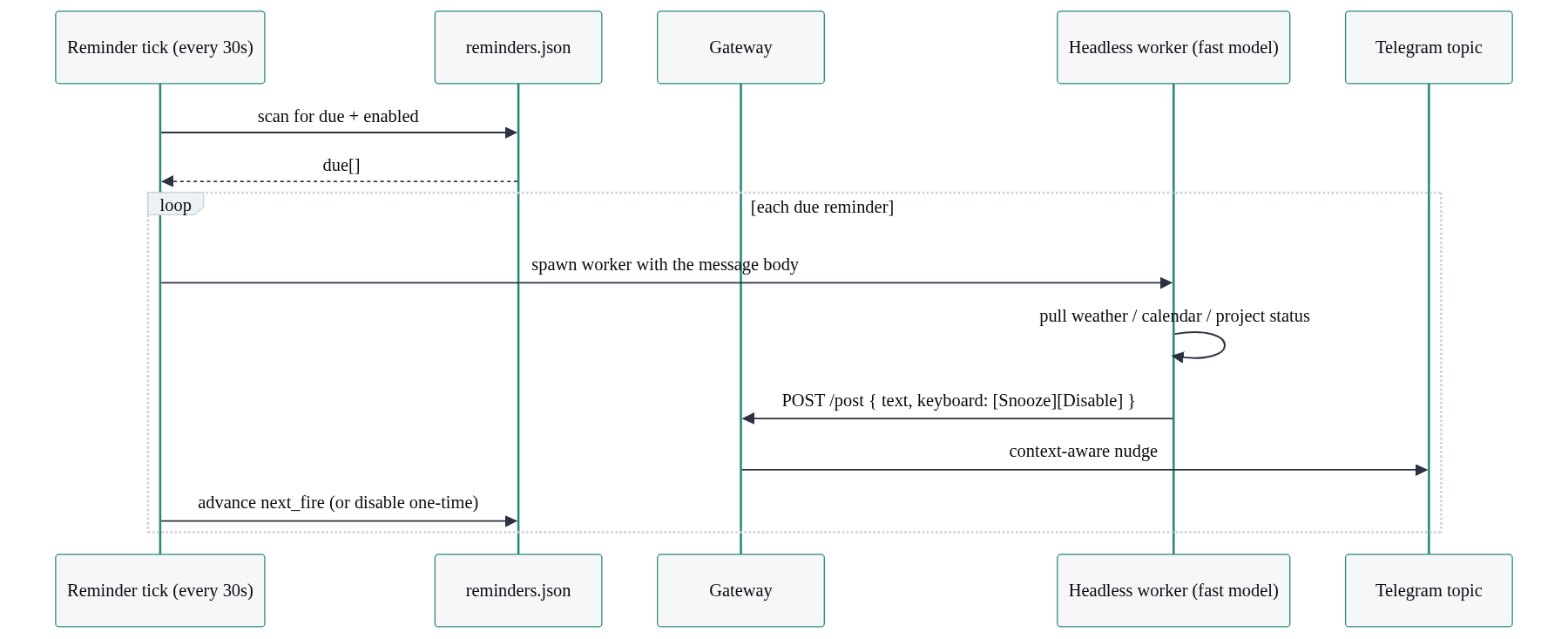
The /post route attaches an inline keyboard so a nudge can carry [Snooze 1h] and [Disable] buttons. Telegram sends button presses back as callback queries to your webhook, and you handle them the same way you handle messages.
Piece 7: background workers for the heavy stuff
A topic session’s day job is conversation. It should stay responsive. So when you ask it to do something that takes twenty minutes (a deep research dispatch, a code build, reviewing a long document), it should not block. It hands the work to a background worker and gets out of the way.
A topic session calls one script, scripts/spawn-agent.sh, with an agent role, a task slug, the target chat and thread, and a task prompt:
scripts/spawn-agent.sh <agent> <task-slug> <chat_id> <thread_id> -- "<task prompt>"
# agent ∈ {forge, atlas, sentinel, argus, scribe}
I run five named roles, each just a different system-prompt file in prompts/:
- Forge ships code: takes a brief, works in a git worktree, runs tests, opens a PR.
- Atlas researches and writes (this post was an Atlas dispatch).
- Sentinel reviews non-code work.
- Argus reviews code, with a cross-model second opinion before its verdict.
- Scribe watches your chat messages and extracts durable facts into the memory layer.
What spawn-agent.sh actually does is the part worth copying, and none of it is specific to Claude Code:
- Generate a unique
agent_idof the form<agent>-<slug>-<timestamp>-<random>. - Resolve the role’s prompt file and the working directory.
- Spawn the worker. The four heavy roles (forge, atlas, sentinel, argus) launch as full, interactive Claude Code sessions in the same tmux fleet as your topic sessions, not a headless one-shot. The task prompt is injected over a per-agent channel, the same webhook-channel mechanism the gateway already uses for topics, and the agent runs on your own Claude subscription, so background work doesn’t cost extra API tokens. Scribe, the cheap high-volume memory extractor, is the exception: it stays a headless
claude -pone-shot writing a stream-json log. Either way it’s a separate process from your long-running session, and it runs to completion and reports back. - Write a
spawnrow torunning-agents.jsonl, holding aflockso a concurrent registry prune can’t clobber the append. - Capture the worker’s real child PID (not the wrapper’s) so the watchdog can check liveness.
- On exit, append a
completedrow with the exit code.
The registry append is the load-bearing detail. Here is the actual write, from spawn-agent.sh, using a file lock so the gateway’s registry pruner and the spawn helper never step on each other:
# spawn-agent.sh writes the spawn row under flock.
import fcntl, json
row = {
    "event": "spawn", "agent_id": agent_id, "agent": agent,
    "pid": int(pid), "log_path": log, "spawned_at": spawned,
    "cwd": cwd, "chat_id": chat, "thread_id": thread,
}
lock_path = os.path.join(os.path.dirname(registry), ".registry.lock")
with open(lock_path, "w") as lockf:
    fcntl.flock(lockf, fcntl.LOCK_EX)
    with open(registry, "a") as f:
        f.write(json.dumps(row) + "\n")
When the worker finishes, it posts its result to the originating topic through the gateway’s /post route. The gateway does one extra thing here that makes the system feel coherent: it echoes that post back into the originating session as an informational <channel> turn tagged system="notice". So the next time you message the Tabs topic, the Tabs session already has the research result in its own context. It doesn’t ask “what report?” because it saw the report land.
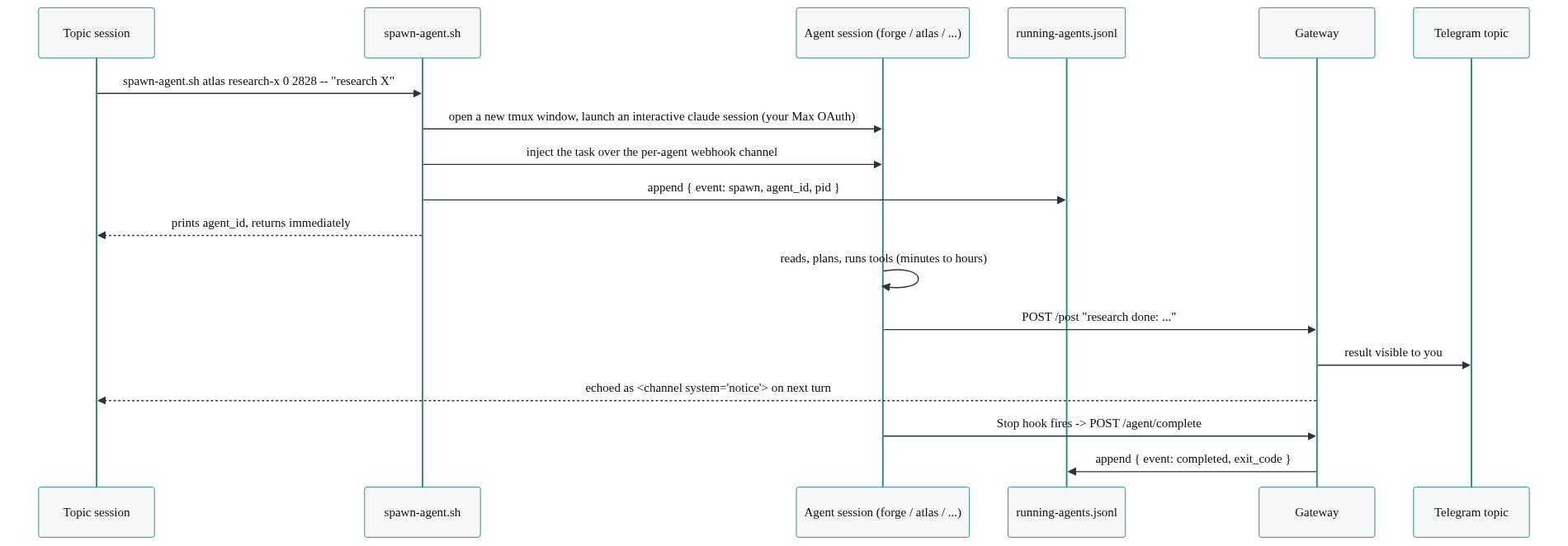
The watchdog from Piece 3 reads running-agents.jsonl every 15 seconds. A worker that spawned but never wrote a completed row, and whose PID is gone, crashed silently. The watchdog catches that and posts an alert into the topic instead of leaving you waiting forever. In a recent week the registry held 1,124 spawn events and 1,089 completions; the gap is exactly what the watchdog is for.
One of these roles, Forge, is the build half of an autonomous build-review-merge loop I call Trident. I point a worker at a spec, it writes the code, a second worker reviews it with a cross-model check, and the loop runs until the review passes. That deserves its own post, and it has one: how I built an autonomous build pipeline and then let it improve itself.
What this looks like running for real
Numbers from disk on the system as I write this, so you know the shape is real and not a demo:
- 24 entries in
topic-map.json, roughly twenty of them live, long-running sessions. (topic-map.json.) - 1,124 background-agent spawns in a recent week, 1,089 completions. By role: scribe 580, forge 317, argus 213, atlas 14. (
running-agents.jsonl.) - 102 reminders defined, 87 enabled. (
reminders.json.) - 609 commits to the substrate since the first one on 2026-04-08. (
git rev-list --count HEAD.) - 672 verbatim “originals,” 119 people, 186 companies in the memory layer. (
ls entities/.)
A few moments from actual daily use that show why the pieces matter together.
The morning brief. Every morning a worker runs before I’m up, reads my overnight email, my calendar, the weather, and the status file of every active project, and posts a brief into my general topic. What’s on me today, who’s waiting, what’s at risk. It’s a Piece 6 reminder (the trigger) spawning a Piece 7 worker (the composition) reading the Piece 5 memory (the context) and posting through the Piece 3 gateway (the delivery). Every piece in this post, in one daily artifact.
The voice-to-draft loop. I hold the mic button in a project topic and talk for fifteen seconds: pull this invoice, find the double-charge, draft the reply. The voice note goes through the webhook, gets transcribed, lands in the right session as a <channel> turn, the session does the reading and the math and the writing, and a draft comes back with a button to send. No laptop, no terminal. Under the hood it’s Pieces 2, 3, and 4 doing their jobs.
Cross-topic dispatch. I can ask the Neutron topic to have another topic do work, and the result lands back where it belongs. One session calls dispatch, the gateway routes it to the other channel, that session does the work and posts back. Sessions stay isolated by default; cross-talk is explicit and goes through the gateway.
Autonomous shipping. A large share of the 609 commits above were written by Forge workers and merged after an Argus review, with me approving the brief and the merge but not touching the keyboard in between. The full mechanics, including the cross-model review and the time it ran the loop on its own substrate, are in the Trident post.
None of these involve a terminal. None involve me at my desk. Most involve me talking, not typing. That’s the entire point of building the harness: the intelligence was already there in Claude Code; what was missing was a door you could walk through carrying your real life in your hands.
Introducing Neutron
You can build the spine of everything above in a weekend: a tmux fleet, a Bun gateway, a Telegram bot with forum topics, an MCP reply tool, a memory directory, a reminder tick, and a worker spawner. That’s a real system. It’s the one I use. But the catch is it took months of fine-tuning edge cases in production.
I’ve also already built the polished version. It’s called Neutron, it’s open source under Apache 2.0, and the source is at github.com/rjunee/neutron. Pull it, fork it, send PRs. The origin story explains the bet underneath it: that Claude Code is the right substrate to build on, and the harness around it is the product. The open-source launch post covers what’s in the repo and how to stand it up on your own machine.
And there’s more: Cores
The seven pieces in this post are the substrate. They route messages, run sessions, remember things, and dispatch work. What sits on top of the substrate is where it gets interesting.
Cores are pre-built workflows and apps that install onto this foundation in one click. DTC marketing automation. Legal and compliance workflows. CPA and bookkeeping flows. A sales pipeline. Customer support. Code shipping via Trident. Each Core is a working system, not a template, and each one assumes the substrate you just built is already there underneath it.
That’s a separate post. Build the spine first. The spine is what makes everything else possible.
I'm productizing this substrate as Neutron for operators who want a real agent system without rebuilding it themselves. Separately I take on a small number of consulting engagements per quarter for teams shipping into production. Neutron Enterprise →